Quick answer: OCPP uses WebSocket as the transport layer for real-time, bidirectional messaging between EV chargers and the Central System (CPMS). A persistent connection lets either side send messages instantly without HTTP polling. Messages travel as JSON arrays (CALL, CALLRESULT, CALLERROR), with heartbeats, exponential-backoff reconnection, and TLS/WSS security profiles keeping connections reliable and secure.
OCPP WebSocket communication is the transport layer that enables real-time, bidirectional messaging between EV chargers and their Central System (CPMS). OCPP is the open standard maintained by the Open Charge Alliance, and WebSocket is the channel it rides on. Unlike traditional REST APIs where the client polls for updates, WebSocket maintains a persistent connection — allowing either side to send messages at any time without the overhead of repeated HTTP handshakes.
Understanding how OCPP uses WebSocket is essential for every developer building or integrating with EV charging infrastructure. Most OCPP bugs in production trace back to WebSocket-level issues: connection drops, message ordering problems, or security misconfigurations.
Why Does OCPP Use WebSocket?
OCPP chose WebSocket over alternatives for specific technical reasons:
- Bidirectional: Both the charger and CPMS can initiate messages. The CPMS needs to send commands (RemoteStart, Reset) to chargers without the charger polling for them
- Persistent: A single TCP connection stays open for hours or days, eliminating reconnection overhead
- Low latency: Messages arrive in milliseconds, critical for real-time operations like smart charging profile updates
- Firewall friendly: WebSocket upgrades from HTTP, traversing corporate firewalls and proxies that block raw TCP
- Lightweight: Minimal framing overhead compared to HTTP request/response cycles
OCPP 1.6 supports both WebSocket (JSON) and SOAP, while OCPP 2.0.1 uses WebSocket exclusively, having dropped SOAP support entirely. For a fuller breakdown of the differences, see OCPP 1.6 vs 2.0.1.
How Does the WebSocket Connection Lifecycle Work?
1. WebSocket Handshake
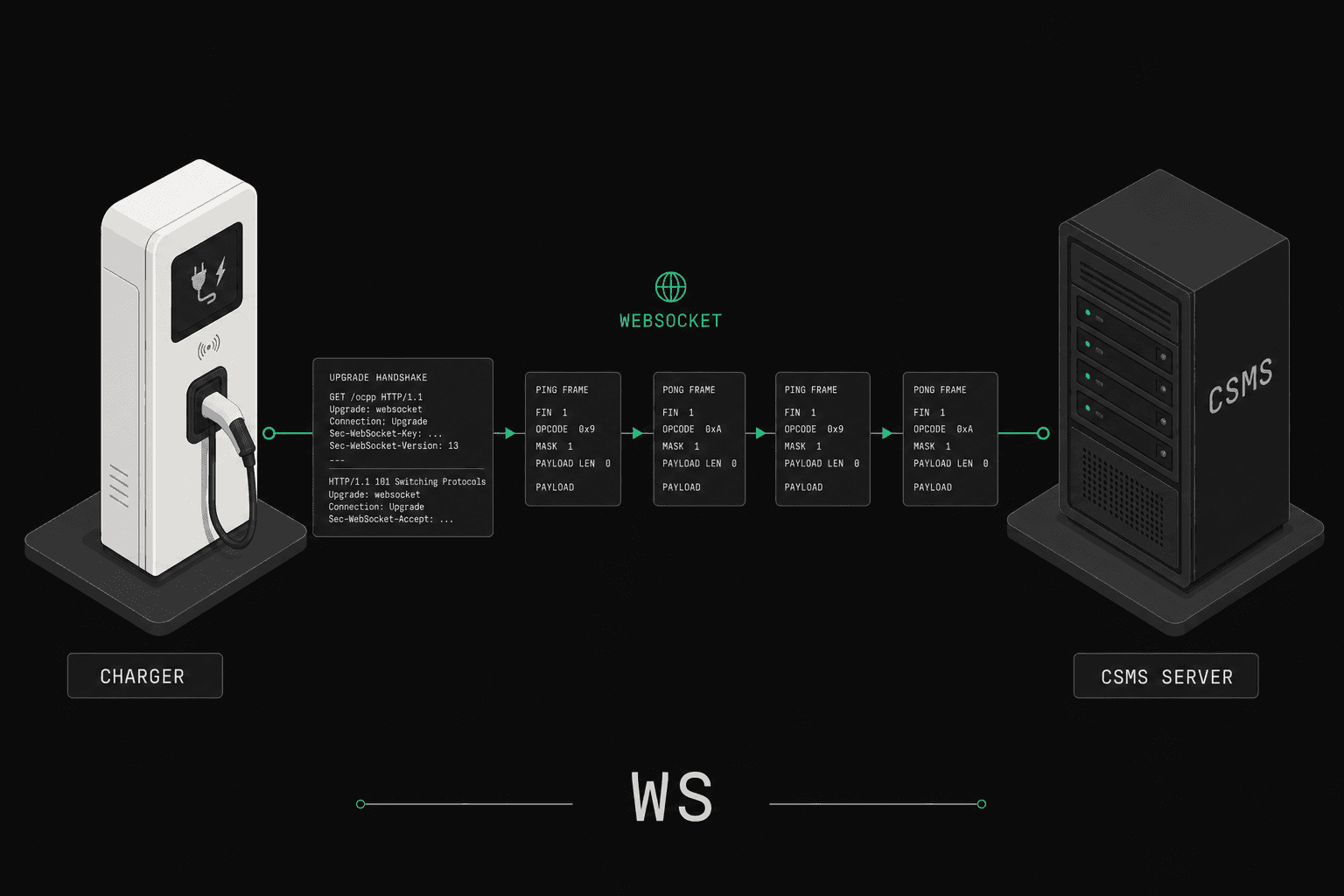
The charge point initiates a WebSocket connection to the CPMS, following the upgrade handshake defined in RFC 6455. The URL follows a specific pattern:
ws://CPMS.example.com/ocpp/CP001
wss://CPMS.example.com/ocpp/CP001
The path typically includes the charge point identity (CP001). The CPMS uses this to identify which charger is connecting.
The HTTP upgrade request includes OCPP-specific subprotocols:
GET /ocpp/CP001 HTTP/1.1
Host: CPMS.example.com
Upgrade: websocket
Connection: Upgrade
Sec-WebSocket-Protocol: ocpp1.6, ocpp2.0.1
Sec-WebSocket-Key: dGhlIHNhbXBsZSBub25jZQ==
The CPMS responds with the selected subprotocol:
HTTP/1.1 101 Switching Protocols
Upgrade: websocket
Connection: Upgrade
Sec-WebSocket-Protocol: ocpp1.6
2. BootNotification
Immediately after the WebSocket connection is established, the charge point sends a BootNotification message:
[2, "19223201", "BootNotification", {
  "chargePointVendor": "EVManufacturer",
  "chargePointModel": "FastCharger-50",
  "chargePointSerialNumber": "SN-001234",
  "firmwareVersion": "3.2.1"
}]
The CPMS responds with the registration status and heartbeat interval:
[3, "19223201", {
  "status": "Accepted",
  "currentTime": "2025-02-13T10:00:00.000Z",
  "interval": 300
}]
3. Normal Operation
Once registered, the charge point and CPMS exchange messages for charging operations, status updates, and remote commands. The connection remains open indefinitely.
4. Disconnection and Reconnection
When the connection drops (network failure, CPMS restart, charger power cycle), the charge point is responsible for reconnecting. The CPMS must restore the charger's state from the last known information.
OCPP JSON Message Format
OCPP defines three message types, all transmitted as JSON arrays over WebSocket. For the full catalog of actions carried inside these envelopes, see the OCPP message types reference:
CALL (Message Type 2)
A request message sent by either party. Format:
[2, "uniqueMessageId", "ActionName", {payload}]Example — Charger sends StatusNotification:
[2, "msg-4501", "StatusNotification", {
  "connectorId": 1,
  "errorCode": "NoError",
  "status": "Charging",
  "timestamp": "2025-02-13T10:15:00.000Z"
}]
Example — CPMS sends RemoteStartTransaction:
[2, "cmd-7890", "RemoteStartTransaction", {
  "connectorId": 1,
  "idTag": "RFID-ABC123"
}]
CALLRESULT (Message Type 3)
A successful response to a CALL. The message ID must match the original CALL:
[3, "uniqueMessageId", {payload}]Example — CPMS responds to StatusNotification:
[3, "msg-4501", {}]Example — Charger responds to RemoteStartTransaction:
[3, "cmd-7890", {
  "status": "Accepted"
}]
CALLERROR (Message Type 4)
An error response to a CALL. Used when the message cannot be processed:
[4, "uniqueMessageId", "errorCode", "errorDescription", {errorDetails}]Example — Unknown action error:
[4, "msg-9999", "NotImplemented",
  "This action is not supported",
  {}]
Standard OCPP Error Codes
These are the codes carried in the errorCode slot of a CALLERROR; for a complete walkthrough with troubleshooting tips, see the OCPP error codes reference.
| Error Code | Meaning |
|---|---|
NotImplemented |
Requested action is not known or supported |
NotSupported |
Action is recognized but not supported |
InternalError |
Internal error in the receiver |
ProtocolError |
Payload does not conform to protocol |
SecurityError |
Security issue (e.g., invalid certificate) |
FormationViolation |
Payload is syntactically incorrect |
PropertyConstraintViolation |
Property value violates constraints |
OccurrenceConstraintViolation |
Required property is missing |
TypeConstraintViolation |
Property has wrong type |
GenericError |
Catch-all for other errors |
How Does the Heartbeat Mechanism Work?
The Heartbeat message serves two purposes: confirming the charge point is still connected, and synchronizing its clock with the CPMS.
[2, "hb-001", "Heartbeat", {}][3, "hb-001", {
"currentTime": "2025-02-13T10:05:00.000Z"
}]The heartbeat interval is set by the CPMS in the BootNotification response, and operators commonly configure it to anywhere from under a minute to several minutes depending on fleet size and tolerance for stale state. If the CPMS does not receive a heartbeat within the expected window, it should consider the charge point offline.
Important implementation details:
- Any OCPP message resets the heartbeat timer — if a charger sends
MeterValues, it does not need to send a separate Heartbeat until the next interval - The CPMS should allow some tolerance (e.g., 2x the interval) before marking a charger offline, accounting for network jitter
- Charge points should use the
currentTimefrom the response to correct clock drift
What Are the Best Reconnection Strategies?
Network disconnections are inevitable. A robust OCPP implementation needs a reliable reconnection strategy.
Exponential Backoff
The recommended approach for charge point reconnection:
Attempt 1: Wait 1 second
Attempt 2: Wait 2 seconds
Attempt 3: Wait 4 seconds
Attempt 4: Wait 8 seconds
...
Maximum: Wait 300 seconds (5 minutes)
Adding random jitter (0-30% of the wait time) prevents the "thundering herd" problem — where hundreds of chargers reconnect simultaneously after a CPMS restart.
CPMS-Side Reconnection Handling
When a charge point reconnects, the CPMS must:
- Accept the new WebSocket connection
- Process the
BootNotification(may returnAcceptedorPending) - Request current status via
TriggerMessageforStatusNotification - Reconcile any transactions that were active during disconnection
- Re-apply any pending charging profiles or configuration changes
Connection Monitoring
| Strategy | Implementation | Typical Interval |
|---|---|---|
| OCPP Heartbeat | Application-level ping | 60-300 seconds |
| WebSocket Ping/Pong | Protocol-level keepalive | 30-60 seconds |
| TCP Keepalive | OS-level connection check | 60-120 seconds |
| Load Balancer Health Check | Infrastructure-level | 10-30 seconds |
Use multiple layers. WebSocket Ping/Pong detects dead connections faster than OCPP Heartbeat, while TCP Keepalive catches cases where both endpoints think the connection is alive but an intermediate device has dropped it.
How Do TLS and WSS Secure OCPP?
Production OCPP deployments must use encrypted WebSocket connections (WSS — WebSocket Secure):
OCPP Security Profiles
OCPP 2.0.1 defines three mandatory security profiles. The numbering below matches the OCPP 2.0.1 specification. For a deeper treatment, see OCPP security profiles explained.
| Profile | Authentication | Encryption | Required by OCPP 2.0.1? |
|---|---|---|---|
| Profile 1 | HTTP Basic Auth | None — unencrypted (ws://) | Yes (at minimum) |
| Profile 2 | HTTP Basic Auth | TLS with server certificate (wss://) | Optional, recommended |
| Profile 3 | TLS client certificate (mutual auth) | TLS with client + server certificates (wss://) | Optional, strongest |
OCPP 1.6 uses different numbering. The OCPP 1.6 Security Whitepaper edition 2 defines Profiles 0–3, where 1.6 Profile 0 ≈ 2.0.1 Profile 1 (ws:// + Basic Auth), 1.6 Profile 1 ≈ 2.0.1 Profile 2 (wss:// + Basic Auth), and 1.6 Profile 2 ≈ 2.0.1 Profile 3 (mTLS). 1.6 Profile 3 adds a signed Basic Auth token on top of mTLS. Plain-core 1.6 deployments without the whitepaper extension use ws:// with no authentication.
TLS Implementation Checklist
- Use TLS 1.2 or higher (TLS 1.3 preferred)
- Validate server certificates on the charge point side
- For Profile 3, manage client certificate provisioning and rotation
- Pin certificates or use a dedicated CA for your charging network
- Configure cipher suites to exclude weak algorithms (no RC4, no 3DES)
- Handle certificate expiration gracefully with automated renewal
How Do You Debug OCPP WebSocket Issues?
Common Problems and Solutions
Connection refused: The CPMS is not listening on the expected port or the charge point URL path is incorrect. Verify the WebSocket endpoint URL and that the subprotocol header matches.
Connection drops after 60 seconds: A load balancer or proxy is closing idle connections. Ensure WebSocket Ping/Pong frames are being sent, or configure the infrastructure to allow long-lived connections.
Messages not received: Check that both sides handle WebSocket fragmentation correctly. Some OCPP libraries buffer incomplete frames, and large messages (like firmware update notifications) may be split across multiple WebSocket frames.
Authentication failures: Verify that HTTP Basic Auth credentials or TLS client certificates are correctly configured. Check certificate chain completeness — intermediate CA certificates are a frequent omission.
Message ordering issues: OCPP requires that a CALL is answered before the next CALL is sent in the same direction. However, both the charger and CPMS can each have one outstanding CALL simultaneously — one in each direction. Sending a second CALL in the same direction before receiving a response to the first causes undefined behavior.
Testing WebSocket Communication with OCPPLab
Debugging WebSocket issues with physical chargers is time-consuming — you cannot easily inspect what the charger is sending, inject specific errors, or reproduce timing-sensitive bugs.
OCPPLab provides full visibility into OCPP WebSocket communication:
- Message Inspector: View every WebSocket frame with exact timestamps, including Ping/Pong
- Connection Simulation: Test reconnection scenarios, slow networks, and connection drops
- Error Injection: Send malformed JSON, unknown actions, or out-of-sequence messages to test CPMS error handling
- Security Profile Testing: Validate all OCPP security profiles including TLS client certificate authentication
- Multi-Connection Load: Open hundreds of simultaneous WebSocket connections to stress-test your CPMS
Whether you are debugging a single charger's connection issue or validating that your CPMS handles 5,000 concurrent WebSocket connections, OCPPLab gives you the control and visibility that physical hardware cannot.
Frequently Asked Questions
Can OCPP work over HTTP instead of WebSocket?
OCPP 1.6 also has a SOAP variant (OCPP 1.6S), but it is legacy and rarely used in new deployments. OCPP 2.0.1 requires WebSocket exclusively. WebSocket is strongly recommended for all new implementations because it enables server-initiated messages (which HTTP cannot do without polling).
How many WebSocket connections can a CPMS handle?
This depends entirely on the CPMS architecture. A well-optimized CPMS on modern infrastructure can comfortably handle tens of thousands of concurrent WebSocket connections, and far more with horizontal scaling. The bottleneck is typically database writes (MeterValues), not the WebSocket connections themselves.
What happens to active transactions when WebSocket disconnects?
The charge point continues charging locally. Transaction data (MeterValues) is typically queued and sent after reconnection. The CPMS should detect the disconnection and await reconnection, then reconcile any missed data. OCPP 2.0.1 handles this more gracefully than 1.6 with its improved transaction model.
Should I use a WebSocket library or implement the protocol myself?
Always use an established WebSocket library. Implementing the WebSocket protocol from scratch introduces unnecessary risk. For OCPP specifically, use an OCPP library that handles message routing, ID generation, and timeout management on top of the WebSocket layer.
How do I handle WebSocket connections behind a load balancer?
Use sticky sessions (session affinity) to ensure a charge point always connects to the same CPMS instance, or implement a shared session store. The load balancer must support WebSocket upgrade and long-lived connections. Configure appropriate idle timeout values to prevent premature disconnection.