Quick answer: OCPP 2.0.1 is a major redesign of OCPP 1.6, not a backwards-compatible upgrade. The biggest differences: 2.0.1 has mandatory security profiles (1.6 makes them optional via the Security Whitepaper edition 2), a structured device model instead of flat config keys, a unified TransactionEvent instead of separate StartTransaction/StopTransaction, native ISO 15118 Plug & Charge support, and renamed remote commands (RequestStartTransaction instead of RemoteStartTransaction). OCPP 1.6 is still the most widely deployed version; OCPP 2.0.1 is the standard for new high-security and smart-charging deployments.
OCPP 1.6 and OCPP 2.0.1 are the two active versions of the Open Charge Point Protocol, both published by the Open Charge Alliance (OCA). OCPP 1.6 is deployed on the vast majority of charge points worldwide (estimated 80%+ of installed base as of 2025), while OCPP 2.0.1 is the standard for new deployments requiring advanced security, ISO 15118 Plug & Charge, and grid-integrated smart charging.
Most production CPMS platforms need to support both versions simultaneously, since operators typically manage mixed fleets of legacy and modern charge points.
If you need version-specific validation guidance, start with OCPP 1.6 testing and OCPP 2.0.1 testing.
By the numbers — per the Open Charge Alliance and the official compliance test packs:
- OCPP 1.6 core defines 28 unique actions across 10 charger-initiated + 19 CPMS-initiated messages (with
DataTransfergoing in both directions). The OCPP 1.6 Security Whitepaper edition 2 extension adds 11 more, bringing the total to ~39. - OCPP 1.6 ships with 178 official OCTT (compliance) test cases (102 Charge Point, 76 Central System).
- OCPP 2.0.1 Edition 2 defines 64 operations across 16 functional blocks (A–P), of which 12 blocks (A, B, C, E, F, G, J, K, L, M, N, P) have 365 official Part 6 test cases (230 Charging Station + 135 CPMS).
- OCPP 1.6 schemas are JSON Schema draft-04; OCPP 2.0.1 schemas are JSON Schema draft-06.
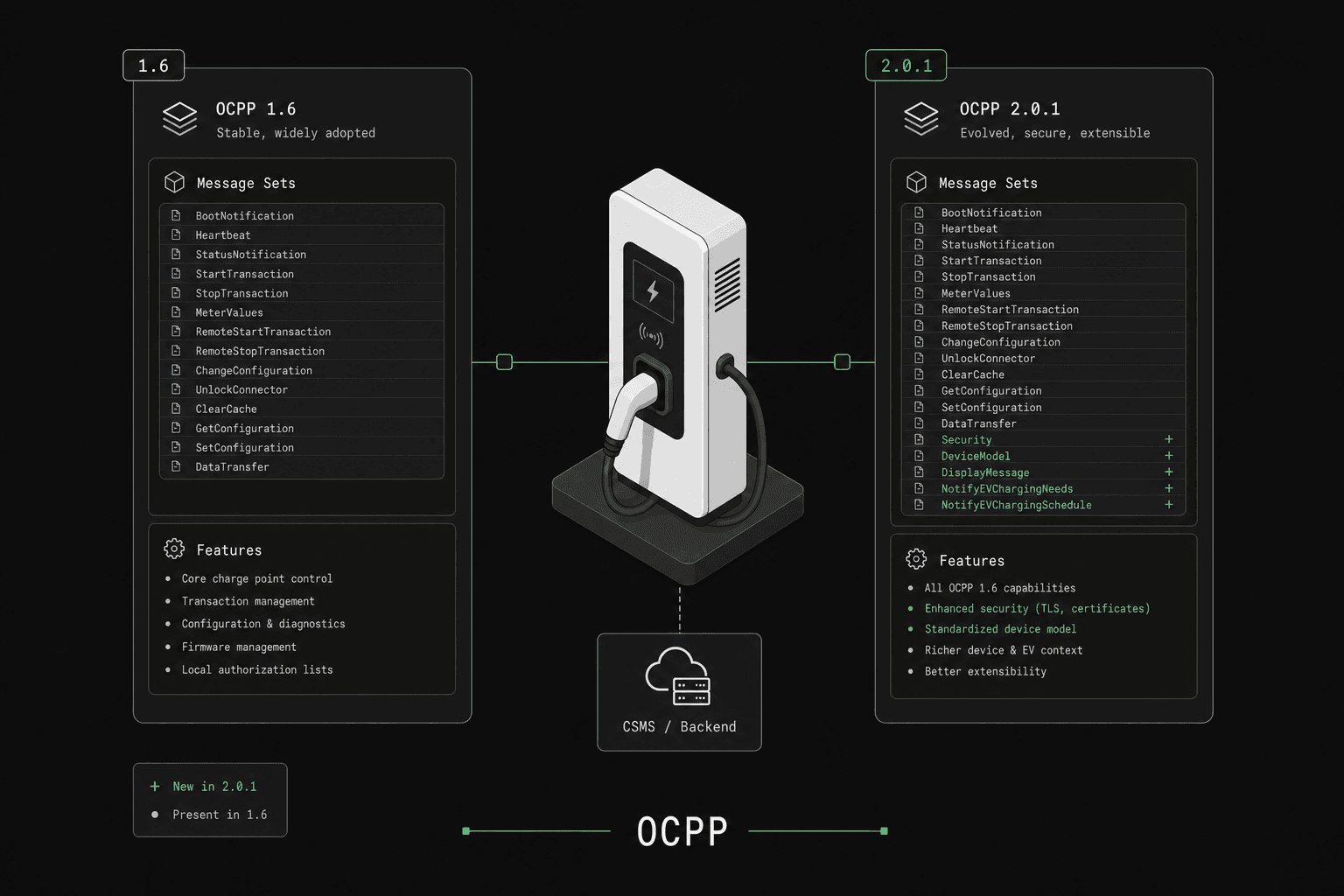
Quick Comparison: OCPP 1.6 vs 2.0.1
| Feature | OCPP 1.6 | OCPP 2.0.1 |
|---|---|---|
| Release Year | 2015 | 2020 |
| Transport | WebSocket + SOAP | WebSocket only |
| Message Format | JSON or SOAP/XML | JSON only |
| Security | Optional TLS in core; Profiles 0–3 via Security Whitepaper edition 2 (opt-in extension) | Mandatory security profiles (1, 2, 3) |
| ISO 15118 | Not natively supported | Full Plug & Charge support |
| Smart Charging | Basic charge profiles | Composite schedules with priorities |
| Device Model | Limited configuration keys (~50) | Comprehensive variable system (500+) |
| Firmware Updates | Basic via UpdateFirmware; SignedUpdateFirmware available via Security Whitepaper edition 2 |
Signed firmware, secure boot |
| Transaction Handling | Start/Stop based | Event-driven with automatic recovery |
| Display Messages | Not available | Remote display control |
| Cost Information | Not available | Real-time pricing updates |
| Reservations | Basic connector reservation | EVSE-based reservations |
| Certificate Management | Not in core; InstallCertificate, SignCertificate, CertificateSigned, DeleteCertificate, GetInstalledCertificateIds available via Security Whitepaper edition 2 |
Full PKI certificate lifecycle |
| Message Count | ~30 message types | ~50+ message types |
| Adoption | Dominant on the installed base | Standard for new high-security deployments |
Why Is Security the Biggest Difference?
Security is the single most significant improvement in OCPP 2.0.1. In OCPP 1.6, TLS encryption is optional — many production deployments run unencrypted WebSocket connections, relying solely on network-level security.
OCPP 1.6 Security
In core OCPP 1.6:
- TLS is optional and often not implemented
- No standardized authentication mechanism
- No certificate management
- No signed firmware updates
- Vulnerable to man-in-the-middle attacks on unencrypted connections
The OCPP 1.6 Security Whitepaper edition 2 is an optional extension that retroactively adds the same security model later made mandatory in OCPP 2.0.1: four security profiles (0/1/2/3, with different numbering than 2.0.1), certificate management messages (InstallCertificate, SignCertificate, CertificateSigned, DeleteCertificate, GetInstalledCertificateIds), signed firmware updates (SignedUpdateFirmware, SignedFirmwareStatusNotification), and security event reporting (SecurityEventNotification). The catch is that whitepaper support is opt-in per deployment, so much of the installed 1.6 base still runs without it.
OCPP 2.0.1 Security Profiles
OCPP 2.0.1 defines three mandatory security profiles (numbered differently from the 1.6 Security Whitepaper edition 2 — 2.0.1 starts at Profile 1, while 1.6 starts at Profile 0):
| Profile | Authentication | Encryption | Use Case |
|---|---|---|---|
| Profile 1 | HTTP Basic Auth | None (ws://) | Trusted private networks only |
| Profile 2 | HTTP Basic Auth | TLS with server certificate (wss://) | Standard production deployments |
| Profile 3 | Mutual TLS (client + server certificates) | Full mTLS (wss://) | High-security enterprise deployments |
Profile 3 provides the strongest security: the charger and CPMS authenticate each other with X.509 certificates, preventing unauthorized devices from connecting. OCPP 2.0.1 also adds:
- Signed firmware updates: Cryptographic verification prevents malicious firmware
- Secure boot: Ensures only authorized firmware runs on the charge point
- Certificate lifecycle management: Install, update, and revoke certificates remotely
How Does Smart Charging Compare?
Smart charging capabilities differ substantially between versions.
OCPP 1.6 Smart Charging
OCPP 1.6 supports SetChargingProfile with basic schedule periods. Each profile contains a stack level and a sequence of time-based power limits.
Limitations:
- Profiles apply per connector only
- No station-wide power distribution
- No external constraint handling (grid operator limits)
- No composite schedule calculation on the charger
- Basic priority system (stack levels 0-99)
OCPP 2.0.1 Smart Charging
OCPP 2.0.1 introduces composite schedules and a hierarchical profile system:
- Charging Station profiles: Apply power limits to the entire station
- EVSE profiles: Apply limits per EVSE (charging point)
- Transaction profiles: Apply limits per active session
- External constraints: Grid operator limits override local profiles
- Composite schedules: Charger calculates the effective schedule from all active profiles
- Cost-based optimization: Charge when electricity is cheapest
| Capability | OCPP 1.6 | OCPP 2.0.1 |
|---|---|---|
| Per-connector limits | Yes | Yes |
| Per-station limits | No | Yes |
| Grid operator constraints | No | Yes |
| Composite schedule calculation | No (CPMS-side only) | Yes (charger-side) |
| Cost-based charging | No | Yes |
| Discharge (V2G) | No | Yes (with ISO 15118) |
How Do the Versions Handle ISO 15118 and Plug & Charge?
ISO 15118 is the standard for high-level communication between EVs and chargers, enabling Plug & Charge — where the vehicle authenticates automatically when plugged in, with no RFID card or app needed.
OCPP 1.6 has no native ISO 15118 support. Some implementations use the DataTransfer message as a workaround, but this is non-standard and inconsistent across vendors.
OCPP 2.0.1 provides full ISO 15118 integration:
- Certificate-based vehicle authentication
- Contract certificate installation and updates
- Signed metering data for billing accuracy
- Vehicle-to-Grid (V2G) communication support
If your roadmap includes Plug & Charge, OCPP 2.0.1 is required.
How Does Transaction Handling Differ?
OCPP 1.6
Transactions follow a simple Start/Stop model:
StartTransaction.req→ CPMS assigns a transaction IDMeterValuessent periodically during chargingStopTransaction.req→ Transaction ends
Problem: If the charger loses connectivity between Start and Stop, the transaction can become orphaned. Recovery requires manual intervention or custom workarounds.
OCPP 2.0.1
Transactions use an event-driven model:
TransactionEvent(Started)→ New transactionTransactionEvent(Updated)→ Meter values, status changesTransactionEvent(Ended)→ Transaction complete
Key improvement: Each event is independently transmitted and can be queued offline. When connectivity is restored, events are sent in order. The CPMS can reconstruct the complete transaction from the event stream, eliminating orphaned transactions.
| Aspect | OCPP 1.6 | OCPP 2.0.1 |
|---|---|---|
| Model | Start/Stop | Event-driven |
| Offline handling | Transaction may be lost | Events queued and replayed |
| Meter values | Separate MeterValues message | Embedded in TransactionEvent |
| ID assignment | CPMS assigns ID (integer) | Charging Station assigns ID (string, 1–36 chars; UUID is common but not required) |
How Does Device Management Differ?
OCPP 1.6
Device configuration uses key-value pairs via GetConfiguration and ChangeConfiguration. There are approximately 50 standardized configuration keys, with vendors often adding proprietary extensions.
OCPP 2.0.1
The comprehensive Device Model replaces configuration keys with a structured variable system:
- Components: Logical parts of the charger (Connector, EVSE, Controller)
- Variables: Attributes of each component (CurrentLimit, Temperature, FirmwareVersion)
- Characteristics: Metadata about each variable (read-only, writable, data type, unit)
This provides 500+ standardized variables covering every aspect of charger configuration, monitoring, and diagnostics. The device model makes it possible to manage any charger without vendor-specific documentation.
Message Types Comparison
Messages Only in OCPP 2.0.1
| Message | Purpose |
|---|---|
SetDisplayMessage |
Control charger screen content |
CostUpdated |
Real-time pricing display |
Get15118EVCertificate |
ISO 15118 certificate management |
GetInstalledCertificateIds |
PKI certificate inventory |
InstallCertificate |
Install new certificates |
DeleteCertificate |
Remove certificates |
NotifyReport |
Comprehensive device status reporting |
SetVariables / GetVariables |
Device model management |
SetNetworkProfile |
Network configuration |
PublishFirmwareStatusNotification |
Firmware distribution status |
ReportChargingProfiles |
Smart charging profile reporting |
ClearedChargingLimit |
External constraint acknowledgment |
Messages in Both Versions (with improvements in 2.0.1)
| Message | 1.6 Behavior | 2.0.1 Improvement |
|---|---|---|
BootNotification |
Basic charger registration | Includes reason (PowerUp, Watchdog, etc.) |
StatusNotification |
Per-connector status | Per-EVSE + per-connector status |
FirmwareUpdate |
HTTP download | Signed firmware with integrity check |
RemoteStartTransaction |
Start by ID tag | Start with charging profile + EVSE selection |
When Should You Use Which Version?
Choose OCPP 1.6 if:
- You need maximum compatibility with existing chargers
- Your network consists primarily of AC Level 2 chargers
- ISO 15118 Plug & Charge is not on your roadmap
- You need to ship a working product quickly on a budget
Choose OCPP 2.0.1 if:
- Security is a top priority (regulatory or enterprise requirements)
- You need ISO 15118 Plug & Charge support
- You're building a new platform from scratch
- You need advanced smart charging for grid integration
- You're deploying DC fast chargers with complex billing
- You want future-proof architecture
Best Practice: Support Both
Most modern CPMS platforms support OCPP 1.6 and 2.0.1 simultaneously. A typical production network has:
- Legacy AC chargers on OCPP 1.6
- New DC fast chargers on OCPP 2.0.1
- The CPMS handles protocol translation internally
Migration Guide: OCPP 1.6 to 2.0.1
Step 1: Assess Your Current Implementation
Audit your OCPP 1.6 message handlers. Map each handler to its 2.0.1 equivalent:
StartTransaction/StopTransaction→TransactionEventGetConfiguration/ChangeConfiguration→GetVariables/SetVariablesMeterValues→ Embedded inTransactionEvent(Updated)
Step 2: Implement the Device Model
The device model is the biggest architectural change. You'll need:
- A database schema for Components, Variables, and their Characteristics
- Handlers for
GetBaseReport,NotifyReport,GetVariables,SetVariables - A mapping layer from your existing configuration to the device model
Step 3: Migrate Transaction Handling
Replace Start/Stop transaction logic with the event-driven model:
- Handle
TransactionEventwith Started, Updated, and Ended types - Implement event sequencing and offline event replay
- Update your billing system to work with event streams
Step 4: Add Security Profiles
Implement at least Security Profile 2 (TLS with server certificate):
- Configure your WebSocket server for TLS
- Implement HTTP Basic Auth over TLS
- Set up certificate management for Profile 3
Step 5: Test Thoroughly
Testing the migration is critical. You need to validate:
- Both protocol versions running simultaneously
- Backward compatibility with existing 1.6 chargers
- All new 2.0.1 message flows
- Security profile negotiation
- Smart charging composite schedules
OCPPLab lets you run OCPP 1.6 and 2.0.1 virtual chargers side by side, test migration scenarios, and validate all error handling paths without physical hardware.
How Do You Test Both OCPP Versions?
Validating an OCPP implementation across both versions requires hundreds of test cases covering message flows, error scenarios, edge cases, and version-specific features. Physical charger testing is impractical at this scale.
OCPPLab provides:
- Side-by-side OCPP 1.6 and 2.0.1 virtual chargers
- 100+ pre-built device model profiles from real charger vendors
- Automated test suites covering all message types in both versions
- Security profile testing (Profile 1, 2, and 3)
- Smart charging composite schedule validation
- Load testing with 10,000+ concurrent connections across both versions
Start your free simulation and test both OCPP versions in minutes.
Frequently Asked Questions
Can a CPMS support both OCPP 1.6 and 2.0.1 simultaneously?
Yes, and most production CPMS platforms do. The CPMS detects the protocol version during the WebSocket handshake (via the Sec-WebSocket-Protocol header) and routes messages to the appropriate handler. This is essential since real-world networks have mixed fleets.
Is OCPP 2.0.1 backward compatible with 1.6?
No. OCPP 2.0.1 is a major protocol revision with different message structures, a new device model, and event-driven transactions. A charger running 1.6 cannot communicate with a CPMS that only supports 2.0.1, and vice versa. The CPMS must implement both versions independently.
Which OCPP version do new chargers support?
Many new commercial chargers support both OCPP 1.6 and 2.0.1. They commonly ship with 1.6 as the default and offer 2.0.1 via firmware update. DC fast charger manufacturers (ABB, Tritium, Kempower) generally have stronger 2.0.1 support than AC charger manufacturers.
When will OCPP 1.6 be deprecated?
The Open Charge Alliance has not announced a deprecation date for OCPP 1.6. Given the massive installed base, 1.6 will remain relevant for many years. However, new deployments are increasingly moving to 2.0.1, and OCA's focus is on the 2.x line.
What is OCPP 2.1?
OCPP 2.1 is the next minor version after 2.0.1, adding features for ISO 15118-20 (bidirectional charging / V2G), improved smart charging, and better tariff handling. It maintains backward compatibility with 2.0.1 chargers for core functionality.
How many message types does each version have?
OCPP 1.6 defines approximately 30 message types. OCPP 2.0.1 defines over 50 message types, with the additions primarily covering the device model, certificate management, ISO 15118, and display messages.
Is OCPP 2.0.1 harder to implement than 1.6?
Yes. OCPP 2.0.1 has a larger specification, more message types, mandatory security requirements, and the complex device model. A typical 2.0.1 implementation takes considerably longer than 1.6. However, the result is significantly more robust and future-proof.
What is the difference between OCPP and OCPI?
OCPP manages communication between a charger and its management system (CPMS). OCPI manages roaming between different charging networks, allowing drivers to use any network with a single account. They serve different purposes and are typically both needed in a production charging network.